Platform Group: sun4u
Current Status, Debian on SPARC platform
Supported are Sun4m and Sun4u machines (with a 32-bit userland).
UltraLinux
Platform Group: sun4u
#include
#include

#define DIE     800

void gen( int a[][DIE]);
void mul( int a[][DIE], int b[][DIE]);

int main(int argc, char *argv[])
{
        int a[DIE][DIE];
        int b[DIE][DIE];

        int i;
        for (i = 0; i < 10000; i++) {
                srand(0);
                gen(a);
                srand(1);
                gen(b);
                mul(a, b);
        }

        return 0;
}

void gen( int a[][DIE] )
{
        int i, j;
        for (i = 0; i < DIE; i++)
                for (j = 0; j < DIE; j++)
                        a[i][j] = random() % 5 + 1;
}

void mul( int a[][DIE], int b[][DIE])
{
        int i, j, k;
        int c[DIE][DIE];

        //Transpose
        for (i = 0; i < DIE; i++)
                for (j = 0; j < DIE; j++)
                        mul[i][j] = b[j][i];

        for (i = 0; i < DIE; i++) {
                for (j = 0;j < DIE; j++) {
                        c[i][j] = 0;
                        for (k = 0; k < DIE; k++)
                                c[i][j] += a[i][k] * mul[i][k];
                        //printf("%d\t", c[i][j]);
                }
                //printf("\n");
        }
}
"This is a free minix-like kernel for i386(+) based AT-machines," began the Linux version 0.01 release notes in September of 1991 for the first release of the Linux kernel. "As the version number (0.01) suggests this is not a mature product. Currently only a subset of AT-hardware is supported (hard-disk, screen, keyboard and serial lines), and some of the system calls are not yet fully implemented (notably mount/umount aren't even implemented)." Booting the original 0.01 Linux kernel required bootstrapping it with minix, and the keyboard driver was written in assembly and hard-wired for a Finnish keyboard. The listed features were mostly presented as a comparison to minix and included, efficiently using the 386 chip rather than the older 8088, use of system calls rather than message passing, a fully multithreaded FS, minimal task switching, and visible interrupts. Linus Torvalds noted, "the guiding line when implementing linux was: get it working fast. I wanted the kernel simple, yet powerful enough to run most unix software." In a section titled "Apologies :-)" he noted:
"This isn't yet the 'mother of all operating systems', and anyone who hoped for that will have to wait for the first real release (1.0), and even then you might not want to change from minix. This is a source release for those that are interested in seeing what linux looks like, and it's not really supported yet."
 白爛的圖片
白爛的圖片dmesg eth0 e1000_request_irq Unable to allocate MSI interrupt Error: 22
unless ( condition )
if (!condition)
print "LA LA LA\n" while 1; # loops forever
if ($a =~ /foo/) { ... } # true if $a contains "foo"
 while (<>) {
        next if /^$/;
        print;
 }
while ((c = get()) != NULL) {
  printf ("%s\n", c);
}
131 Heretic people all over the world have claimed that this inconsistency
132 is ...  well ...  inconsistent, but all right-thinking people know that
133 (a) K&R are _right_ and (b) K&R are right.  Besides, functions are
134 special anyway (you can't nest them in C).
182 When declaring pointer data or a function that returns a pointer type, the
183 preferred use of '*' is adjacent to the data name or function name and not
184 adjacent to the type name.  Examples:
185
186         char *linux_banner;
187         unsigned long long memparse(char *ptr, char **retptr);
188         char *match_strdup(substring_t *s);
209 C is a Spartan language
209 C is a Spartan language, and so should your naming be.  Unlike Modula-2
210 and Pascal programmers, C programmers do not use cute names like
211 ThisVariableIsATemporaryCounter.
224 Encoding the type of a function into the name (so-called Hungarian
225 notation) is brain damaged - the compiler knows the types anyway and can
226 check those, and it only confuses the programmer.  No wonder MicroSoft
227 makes buggy programs.
235 If you are afraid to mix up your local variable names, you have another
236 problem, which is called the function-growth-hormone-imbalance syndrome.
237 See chapter 6 (Functions).
244 It's a _mistake_ to use typedef for structures and pointers.
typedef struct {...} student;
student* stu;
397 Comments are good, but there is also a danger of over-commenting.  NEVER
398 try to explain HOW your code works in a comment: it's much better to
399 write the code so that the _working_ is obvious, and it's a waste of
400 time to explain badly written code.
402 Generally, you want your comments to tell WHAT your code does, not HOW.
403 Also, try to avoid putting comments inside a function body: if the
404 function is so complex that you need to separately comment parts of it,
405 you should probably go back to chapter 6 for a while.  You can make
406 small comments to note or warn about something particularly clever (or
407 ugly), but try to avoid excess.  Instead, put the comments at the head
408 of the function, telling people what it does, and possibly WHY it does
409 it.
420         /*
421          * This is the preferred style for multi-line
422          * comments in the Linux kernel source code.
423          * Please use it consistently.
424          *
425          * Description:  A column of asterisks on the left side,
426          * with beginning and ending almost-blank lines.
427          */
428
429 It's also important to comment data, whether they are basic types or derived
430 types.  To this end, use just one data declaration per line (no commas for
431 multiple data declarations).  This leaves you room for a small comment on each
432 item, explaining its use.
437 That's OK, we all do.  You've probably been told by your long-time Unix
438 user helper that "GNU emacs" automatically formats the C sources for
439 you, and you've noticed that yes, it does do that, but the defaults it
440 uses are less than desirable (in fact, they are worse than random
441 typing - an infinite number of monkeys typing into GNU emacs would never
442 make a good program).
473 recognize the authority of K&R (the GNU people aren't evil, they are
474 just severely misguided in this matter),
void show(char **name)
{
  for (int i = 0; i < 3; i++) cout << *name[i] << endl;
}

char *name[3];
name[0] = "a2n";
name[1] = "c9s";
name[2] = "ccn";
show(name);
  1 #include
  2
  3 using namespace std;
  4
  5 int main()
  6 {
  7         int a = 1, b = 2;
  8         int *x;
  9
 10         cout << "x: " << x << '\t';
 11         cout << "*x: " << *x << '\t';
 12         cout << "&x: " << &x << '\t';
 13
 14         cout << endl;
 15
 16         x = &a;
 17         cout << "x = &a" << '\t';
 18         cout << "x: " << x << '\t';
 19         cout << "*x: " << *x << '\t';
 20         cout << "&x: " << &x << '\t';
 21
 22         cout << endl;
 23
 24         x = &a - 1;
 25         cout << "x = &b" << '\t';
 26         cout << "x: " << x << '\t';
 27         cout << "*x: " << *x << '\t';
 28         cout << "&x: " << &x << '\t';
 29
 30         cout << endl;
 31         return 0;
 32 }
modified code...

x = &a  x: 0012FF7C     *x: 1   &x: 0012FF74
x = &a-1  x: 0012FF78     *x: 2   &x: 0012FF74
x: 0xb7f518dc   *x: -1  &x: 0xbf97f214
x = &a  x: 0xbf97f218   *x: 1   &x: 0xbf97f214
x = &a-1  x: 0xbf97f214   *x: -1080561132 &x: 0xbf97f214
x = &a  x: 0012FF60     *x: 1   &x: 0012FF48
x = &a-1  x: 0012FF5C     *x: -858993460  &x: 0012FF48
  1 #include
  2
  3 using namespace std;
  4
  5 int main()
  6 {
  7         int a = 1, b = 2;
  8         int *x;
  9
 10         cout << "x: " << x << '\t';
 11         cout << "*x: " << *x << '\t';
 12         cout << "&x: " << &x << '\t';
 13
 14         cout << endl;
 15
 16         x = &a;
 17         cout << "x = &a" << '\t';
 18         cout << "x: " << x << '\t';
 19         cout << "*x: " << *x << '\t';
 20         cout << "&x: " << &x << '\t';
 21
 22         cout << endl;
 23
 24         x = &b;
 25         cout << "x = &b" << '\t';
 26         cout << "x: " << x << '\t';
 27         cout << "*x: " << *x << '\t';
 28         cout << "&x: " << &x << '\t';
 29
 30         cout << endl;
 31         return 0;
 32 }
x: 0xb7f078dc   *x: -1  &x: 0xbff350c4
x = &a  x: 0xbff350cc   *x: 1   &x: 0xbff350c4
x = &b  x: 0xbff350c8   *x: 2   &x: 0xbff350c4
跑到 line 10 就結束!

then modified code.
x = &a  x: 0012FF7C     *x: 1   &x: 0012FF74
x = &b  x: 0012FF78     *x: 2   &x: 0012FF74
#include

using namespace std;

int main()
{
        int a, b, c, d, e;
 int i;

        cout << "Input five numbers: \n";
        cin >> a >> b >> c >> d >> e;
        cout << "A: " << &a << "\nB: " << &b
        << "\nC: " << &c << "\nD: " << &d << "\nE: " << &e;

 cout << endl;
 return 0;
}
1
2
3
4
5
A: 0012FF7C
B: 0012FF78
C: 0012FF74
D: 0012FF70
E: 0012FF6C
1
2
3
4
5
A: 0xbfdc2cec
B: 0xbfdc2ce8
C: 0xbfdc2ce4
D: 0xbfdc2ce0
E: 0xbfdc2cdc
#include

using namespace std;

int main()
{

        cout << "Input five numbers: \n";
        cin >> a >> b >> c >> d >> e;
        for (i = 0; i < 5; i++)
                cout << "Var" << i << ":\t"
                << &a - i << " : "
                << *(&a - i) << '\n';

 cout << endl;
 return 0;
}
1
2
3
4
5
Var0:   0012FF7C : 1
Var1:   0012FF78 : 2
Var2:   0012FF74 : 3
Var3:   0012FF70 : 4
Var4:   0012FF6C : 5
1
2
3
4
5
Var0:   0xbfdea9e0 : 1
Var1:   0xbfdea9dc : 2
Var2:   0xbfdea9d8 : 3
Var3:   0xbfdea9d4 : 4
Var4:   0xbfdea9d0 : 5
17:02:46 :: linux-2.6.19.1 $ time gtags

real    25m56.492s
user    1m44.167s
sys     1m47.283s

17:28:48 :: linux-2.6.19.1 $ time htags

real    43m1.615s
user    3m19.044s
sys     21m41.105s

19:09:04 :: linux-2.6.19.1 $ du -sh HTML/
2.1G    HTML/
#include
//#include "algo.h"

void msort2(int lo, int hi, int S[]);
void mg2(int lo, int mid, int hi, int S[]);


void msort2(int lo, int hi, int S[])
{
        int mid;
        if ((lo < hi) && ((hi - lo) > 1))
        {
                mid = (lo + hi) / 2;
                //printf(".S[%d]: %d, S[%d]: %d\n", lo, S[lo], mid, S[mid]);
                msort2(lo, mid, S);
                //printf("..S[%d]: %d, S[%d]: %d\n", mid + 1, S[mid + 1], hi, S[                 hi]);
                msort2(mid + 1, hi, S);
                // Upper is OK
                printf("\nlo: %d, mid: %d, hi: %d\n", lo, mid, hi);
                mg2(lo, mid, hi, S);
        }
}


void mg2(int lo, int mid, int hi, int S[])
{
        int i = lo;
        int j = mid + 1;
        int k = lo;
        int U[16];

        while ((i <= mid) && (j <= hi))
        {
                if (S[i] < S[j]) U[k] = S[i++];
                else U[k] = S[j++];
                k++;
        }

        int a;
        if (i < mid)
                for (a = i; a <= mid; a++)
                        U[a+k] = S[i+a];
        else
                for (a = j; a <= hi; a++)
                        U[k+a] = S[j+a];

        for (a = lo; a <= hi; a++)
        {
                S[a] = U[a];
                printf("S[%d]: %d, ", a, S[a]);
        }
        printf("\n");
}


int main(void)
{
        int S[] = { 27, 10, 12, 20, 25, 13, 15, 22 };
        int sz = sizeof(S) / 4;
        int lo = 0;
        int hi = sz - 1;

        msort2(lo, hi, S);


        printf("\nFinally: ");
        int a;
        for (a = 0; a < 8; a++)
                printf("%d, ", S[a]);
        printf("\n");

        return 0;
}
#include <stdio.h>

int foo(int *pA);
int foo2(int A[]);

int main(void)
{
        int A[] = { 5, 7 };
        int *pA = A;

        printf("%d\n", sizeof(A));
        printf("%d\n", sizeof(*pA)); // 其實我是第一個元素的大小
        printf("%d\n", sizeof(*(pA + 1))); // 我是第二個元素的大小
        printf("%d\n", foo(pA));
        printf("%d\n", foo2(A)); // 其實我也是傳第一個指標過去而已
        return 0;
}

int foo(int *pA)
{ return sizeof(*pA); }

int foo2(int A[])
{ return *(A + 1); }
FILE *fp;
freopen("foo.txt", "w", stdout);
fprintf(fp, "Hello, World\n");
fclose(fp);
printf("Hello, World2\n");
FILE *fp = freopen("foo.txt", "w", stdout);
printf("Hello, World\n");
fclose(fp);
printf("Hello, World2\n");
Setup has no automatic uninstall facility. The recommended method to
remove all of Cygwin is as follows:
Remove all Cygwin services. If a service is currently running, it must first be stopped with `cygrunsrv -E name', where `name' is the name of the service. Then use `cygrunsrv -R name' to uninstall the service from the registry. Repeat this for all services that you installed. Common services that might have been installed are sshd, cron, cygserver, inetd, apache, and so on.
Stop the X11 server if it is running, and terminate any Cygwin programs that might be running in the background. Remove all mount information by typing `umount -A' and then exit the command prompt and ensure that no Cygwin processes remain. Note: If you want to save your mount points for a later reinstall, first save the output of `mount -m' as described at http://cygwin.com/cygwin-ug-net/using-utils.html#mount.
Delete the Cygwin root folder and all subfolders. If you get an error that an object is in use, then ensure that you've stopped all services and closed all Cygwin programs. If you get a 'Permission Denied' error then you will need to modify the permissions and/or ownership of the files or folders that are causing the error. For example, sometimes files used by system services end up owned by the SYSTEM account and not writable by regular users. The quickest way to delete the entire tree if you run into this problem is to change the ownership of all files and folders to your account. To do this in Windows Explorer, right click on the root Cygwin folder, choose Properties, then the Security tab. Select Advanced, then go to the Owner tab and make sure your account is listed as the owner. Select the 'Replace owner on subcontainers and objects' checkbox and press Ok. After Explorer applies the changes you should be able to delete the entire tree in one operation. Note that you can also achieve this in Cygwin by typing `chown -R user /' or by using other tools such as CACLS.EXE.
Delete the Cygwin shortcuts on the Desktop and Start Menu, and anything left by setup.exe in the download directory. However, if you plan to reinstall Cygwin it's a good idea to keep your setup.exe download directory since you can reinstall the packages left in its cache without redownloading them.
If you added Cygwin to your system path, you should remove it unless you plan to reinstall Cygwin to the same location. Similarly, if you set your CYGWIN environment variable system-wide and don't plan to reinstall, you should remove it.
Finally, if you want to be thorough you can delete the registry tree `Software\Cygnus Solutions' under HKEY_LOCAL_MACHINE and/or HKEY_CURRENT_USER. However, if you followed the directions above you will have already removed all the mount information which is typically
the only thing stored in the registry.
--
Alan Lu, a man, enjoy programming & UNIX.
My website: http://alan0098.googlepages.com/
#!/bin/sh
export PATH=/foo/foo:$PATH
Then, we need excute ". start.sh".
$ man 1 bash
BASH_ARGC
An array variable whose values are the number of parameters in each
frame of the current bash execution call stack. The number of
parameters to the current subroutine (shell function or script
executed with . or source) is at the top of the stack. When a
subroutine is executed, the number of parameters passed is pushed onto
BASH_ARGC. The shell sets BASH_ARGC only when in extended debugging
mode (see the description of the extdebug option to the shopt builtin
below)
--
Alan Lu, a man, enjoy programming & UNIX.
My website: http://alan0098.googlepages.com/


$telnet 192.168.0.1 80$nmap -O 192.168.0.1$tracert www.ntu.edu.tw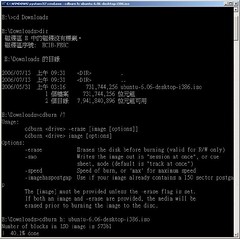
.equ WTCON,  0x01d30000
.equ WTCON,  0x01d30000
.equ PCONE,  0x01d20028
.equ LOCKTIME, 0x1d8000c
.equ PLLCON,  0x01d80000
.equ CLKCON,  0x01d80004


.globl start
start:
b reset
add pc, pc, #0x0c000000
add pc, pc, #0x0c000000
add pc, pc, #0x0c000000
add pc, pc, #0x0c000000
add pc, pc, #0x0c000000
add pc, pc, #0x0c000000
add pc, pc, #0x0c000000
#ifdef L__divsi3
// Compute a 32-bit integer quotient.
//
// From the Intel IA-64 Optimization Guide, choose the minimum latency
// alternative.
//
// in0 holds the dividend.  in1 holds the divisor.

 .text
 .align 16
 .global __divsi3
 .proc __divsi3
__divsi3:
 .regstk 2,0,0,0
 // Check divide by zero.
 cmp.ne.unc p0,p7=0,in1
 sxt4 in0 = in0
 sxt4 in1 = in1
 ;;
 setf.sig f8 = in0
 setf.sig f9 = in1
(p7) break 1
 ;;
 mov r2 = 0x0ffdd
 fcvt.xf f8 = f8
 fcvt.xf f9 = f9
 ;;
 setf.exp f11 = r2
 frcpa.s1 f10, p6 = f8, f9
 ;;
(p6) fmpy.s1 f8 = f8, f10
(p6) fnma.s1 f9 = f9, f10, f1
 ;;
(p6) fma.s1 f8 = f9, f8, f8
(p6) fma.s1 f9 = f9, f9, f11
 ;;
(p6) fma.s1 f10 = f9, f8, f8
 ;;
 fcvt.fx.trunc.s1 f10 = f10
 ;;
 getf.sig ret0 = f10
 br.ret.sptk rp
 ;;
 .endp __divsi3
#endif
.arm
adr   r0, Tstart +1
bx    r0

.thumb
Tstart:
[...]